Front View Bowl Mockup Vol.1
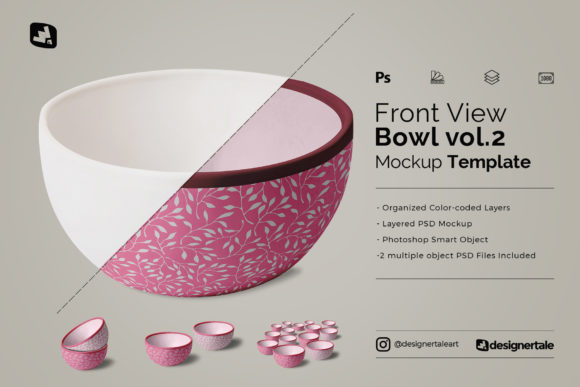
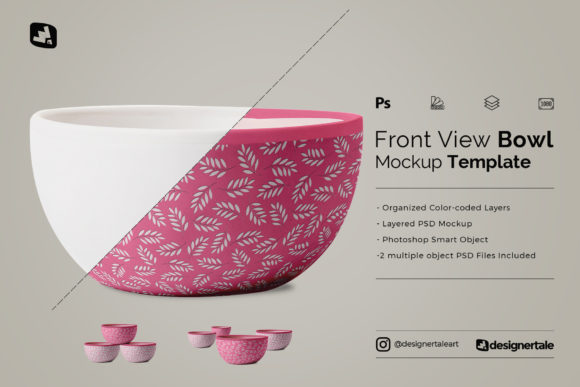
Front View Bowl Mockup Vol.1 is a purpose-built design resource for creators who need to present pattern-based artwork—like surface designs, textile prints, or ceramic decals—in realistic, context-rich settings. It’s not a standalone decorative asset; it’s a workflow accelerator. Whether you’re finalizing a client pitch, preparing product listings for an online store, building a portfolio for freelance applications, or refining a packaging concept, this mockup set bridges the gap between abstract design and tangible presentation.
The core strength of Front View Bowl Mockup Vol.1 lies in its intentional simplicity and structural clarity. It includes three distinct PSD files, each featuring a front-facing bowl composition rendered at 6000 × 4000 pixels and 300dpi resolution. That resolution ensures crisp output across digital platforms—including high-resolution web galleries, print-ready PDFs, and social media previews—without pixelation or scaling artifacts. More importantly, every layer is organized and color-coded: background elements, shadows, bowl structure, and smart object placeholders are grouped logically, reducing the time spent hunting through layers or second-guessing which element controls what.
How It Fits Into Real Creative Workflows
Designers rarely work in isolation. A pattern created in Illustrator or Procreate must eventually land somewhere physical—or at least appear convincingly physical. That transition is where Front View Bowl Mockup Vol.1 integrates seamlessly. Before launching into client revisions, use one of the included bowl sets to preview how your repeat pattern wraps around curvature, interacts with light, and holds visual weight at scale. During production, swap in updated iterations directly via smart objects—no repositioning, no manual masking, no layer duplication. After delivery, repurpose the same mockups across multiple channels: a single edited scene can serve as a hero image on a Shopify product page, a thumbnail in a Behance case study, and a cropped detail for an Instagram carousel.
This isn’t about adding steps—it’s about eliminating friction. Because the layers are pre-organized and non-destructive, you avoid the common time sink of rebuilding mockup structure from scratch each time. And because all three files share the same layer logic, switching between bowl variations (e.g., shallow vs. deep rim, matte vs. glossy finish) doesn’t require relearning the interface. Consistency becomes automatic—not aspirational.
Practical Integration Tips
Start by opening one PSD file in Photoshop and double-clicking the smart object layer labeled “Your Design Here.” This opens a new document window where you paste or place your pattern file. Save that document, and the change instantly updates across the mockup preview. No flattening. No rasterizing. No guesswork.
For efficiency, keep your source patterns aligned to the canvas dimensions used in the smart object (typically 3000 × 3000 px or similar—check the video guide for exact specs). If your pattern includes bleed or requires precise registration, use guides inside the smart object document to mark safe zones. That way, when you scale or shift elements later, alignment remains predictable.
Use the color-coded layers to control realism. The shadow layer, for example, is often set to Multiply blending mode at reduced opacity. Adjusting its opacity alone can simulate different lighting conditions—bright studio light versus warm ambient glow—without touching the bowl texture or background. Similarly, toggling the “Reflection” or “Highlight” layer on or off lets you test how your pattern reads under varying surface treatments.
Compatibility and Cross-Tool Use
Front View Bowl Mockup Vol.1 works best within Adobe Photoshop CC 2020 or newer, but its structure supports interoperability. Export flattened PNGs with transparency for use in Figma presentations or Canva templates. Import those same PNGs into Notion or Airtable as visual references alongside project briefs or client feedback. For educators or content creators, the high-res output supports clean screengrabs during live tutorials—no blurry edges, no visible pixel grid.
If you use Illustrator for pattern creation, copy your final tile directly into the smart object document. Avoid pasting as embedded objects unless necessary; instead, paste as pixels or smart objects to retain editability. And remember: the patterns shown in promotional images aren’t included. That’s intentional—it keeps file size lean and avoids licensing ambiguity. You bring your own IP; the mockup provides the frame.
Preparation and Long-Term Usability
Before using Front View Bowl Mockup Vol.1 in a deadline-driven context, spend 10 minutes walking through the video guide. It’s not just about clicking buttons—it shows how layer groups interact, where to adjust global brightness without affecting texture fidelity, and how to batch-edit multiple bowls using actions if you’re producing variations for A/B testing.
Organize your working folder with parallel structure: one subfolder for raw pattern files, another for exported mockup PNGs, and a third for layered PSDs with version numbers (e.g., bowl-mockup-vol1-clientX-v2.psd). That simple habit prevents version confusion six months later when you revisit a campaign or update a portfolio.
Over time, you’ll notice how consistent use of this mockup builds visual continuity across projects. Clients begin to recognize your presentation style—not because of flashy effects, but because your work always lands with clarity, proportion, and intention. That reliability compounds trust, especially for small business owners selling handmade ceramics or surface designers licensing to manufacturers.
Workflow Examples Across Roles
- Freelance Surface Designer: Uses one bowl mockup to show a single pattern iteration to a client, then swaps in two alternate colorways using the other two PSD files—all within the same hour. No new assets needed.
- E-commerce Small Business Owner: Takes the same mockup file, replaces the pattern with their latest seasonal print, exports three sizes (desktop, mobile, thumbnail), and uploads directly to their WooCommerce gallery—no retouching required.
- Design Educator: Imports the PSD into a screen recording session, zooms into layer groups while explaining non-destructive editing, then saves the annotated version for student reference.
- Marketing Specialist: Combines the bowl mockup with a lifestyle photo background (via layer mask), adds subtle text overlay, and generates five social ad variants in under 20 minutes.
None of these uses require advanced Photoshop expertise. They rely instead on thoughtful structure—and Front View Bowl Mockup Vol.1 delivers that structure out of the box.
What makes it sustainable isn’t just resolution or organization—it’s predictability. You know exactly where to click, what will update, and how much time each edit will take. In creative work, that predictability translates directly into capacity: more room for iteration, clearer communication, fewer last-minute fixes. And because the files remain editable and scalable, they don’t expire with software updates or platform changes. They’re infrastructure—not decoration.
If your process involves showing how a flat pattern lives in three-dimensional space, Front View Bowl Mockup Vol.1 removes the guesswork. It doesn’t replace skill—it sharpens execution. And in a world where speed, clarity, and consistency define professional credibility, that’s not just useful. It’s essential.