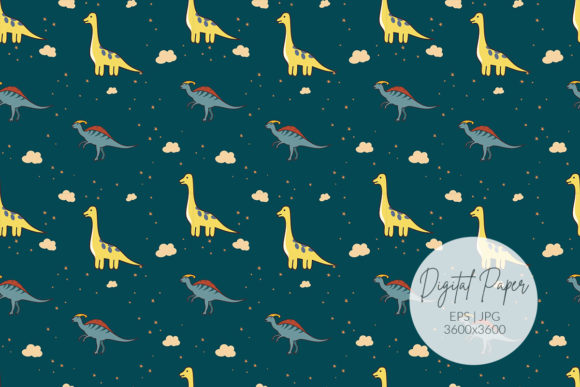
Seamless Dinosaur Pattern
A Seamless Dinosaur Pattern isn’t just another clipart download—it’s a versatile, repeatable design built to tile perfectly across any surface without visible seams or awkward breaks. Think of it as a background that behaves: whether you're printing custom wrapping paper, designing a classroom bulletin board, or building a playful Instagram story template, this pattern flows naturally edge to edge. Its charm lies in both its visual appeal—friendly, stylized dinosaurs in balanced scale and color—and its technical readiness for real-world use.
Why creators reach for this pattern (and why some regret it later)
Many adults—teachers preparing lesson materials, small business owners branding kids’ products, freelance designers building social media kits—choose a Seamless Dinosaur Pattern because it promises quick wins: no cropping, no alignment headaches, no pixelated stretching. That’s true—but only if the file you select actually delivers on “seamless” in practice. Too often, people assume all dinosaur-themed repeats are equal. They’re not.
Some downloads labeled “seamless” are merely scaled-up JPEGs with hard edges disguised by white space—or worse, patterns that *look* continuous at thumbnail size but break apart when tiled at 100% zoom. Others lack sufficient resolution for print, or use outdated vector formats that don’t open reliably in modern design software. These oversights don’t show up until you’re mid-project: trying to scale a background for a 24″x36″ poster, only to find jagged edges; uploading to Canva and discovering the EPS won’t import; or realizing too late the colors shift when converted from RGB to CMYK for professional printing.
The resolution trap—and why 3600 x 3600 px matters more than you think
Resolution isn’t about “more pixels = better.” It’s about matching output needs. A 72 dpi web banner doesn’t need 3600 px—but a letter-sized printable scrapbook paper sheet does. That’s where the included JPG High-resolution file – 3600 x 3600 px becomes genuinely useful. At 300 dpi, it covers up to 12″x12″ with crisp clarity. Scale beyond that? You’ll want the vector version.
Here’s what often gets missed: JPEGs can’t scale infinitely. If you try to stretch that 3600 px file to fill a 48″ trade show backdrop, it will soften or blur—even with smart upscaling tools. The solution isn’t guessing—it’s using the right format for the job. That’s why the EPS 10 file is included: it’s editable, infinitely scalable, and compatible with Adobe Illustrator, Affinity Designer, CorelDRAW, and most professional layout tools. Don’t treat the JPG and EPS as interchangeable backups. Treat them as complementary tools—one for fast digital use, the other for precision print or customization.
Vector confusion: Not all EPS files are created equal
EPS stands for Encapsulated PostScript—but that doesn’t guarantee usability. Older EPS versions (pre-EPS 10) may contain raster elements, embedded fonts, or transparency effects that don’t translate cleanly into newer software. Some sellers even rename low-res PNGs with an “.eps” extension—a red flag. Before downloading or purchasing, verify two things: the file opens cleanly in your primary design app, and all dinosaur shapes remain fully editable (not flattened or grouped irreversibly).
Real example: A homeschool blogger bought a “seamless dinosaur EPS,” only to find it opened as a single locked image in InDesign—no way to recolor individual dinos or adjust spacing. She’d assumed “vector” meant “flexible.” Instead, she spent hours redrawing elements from scratch. The fix? Check the product description for terms like “fully layered,” “unlocked paths,” or “CMYK/RGB ready.” Better yet—download a free sample or preview file first, and test it in your own workflow.
Color, context, and quiet compatibility issues
Dinosaurs are fun—but they’re also context-sensitive. A bright, saturated Seamless Dinosaur Pattern works beautifully on a child’s birthday card or a preschool newsletter. It can feel overwhelming or tonally mismatched on a law firm’s internal training deck or a minimalist wellness brand’s Pinterest graphic. That’s not a flaw in the pattern—it’s a reminder that seamless doesn’t mean universal.
Also worth checking: Does the pattern include transparent background options? If you plan to layer it over photos or textured overlays, a white-background JPG limits flexibility. The best versions give you both—transparent PNG for digital compositing, and white or colored variants for direct print use. And if you’re using it for physical products (stickers, fabric prints, vinyl decals), confirm the color mode. RGB looks vibrant on screen; CMYK ensures accurate ink coverage on press.
What to check before you commit—practical checklist
- Tile behavior: Open the JPG in Photoshop or GIMP, then use “Filter > Other > Offset” (set horizontal/vertical to half the image width). Look for visible seams, color shifts, or misaligned edges at the center crosshair.
- Software compatibility: Try opening the EPS in your usual vector app *before* finalizing a project. If it fails or appears pixelated, contact the seller for a corrected version—not after you’ve built three layouts around it.
- Licensing scope: Does the license allow commercial use? Social media? Physical products? Some free resources restrict resale or require attribution—even for personal craft projects shared publicly. Read the fine print, not just the headline.
- Color consistency: Sample swatches from the pattern and compare them against your brand palette or existing project files. Small hue variations compound when repeated across large surfaces.
Getting the most out of your Seamless Dinosaur Pattern
This pattern shines when treated as a foundational element—not just decoration. Use it to unify a suite of materials: same repeat on invitation + envelope liner + thank-you card background. Or isolate one dino shape from the vector file, recolor it, and turn it into a custom icon set for a children’s app interface. Educators print it at low opacity as subtle notebook headers; marketers layer it under bold typography for playful email banners; crafters cut it into stencils for painted furniture.
The key isn’t complexity—it’s intention. Choose the Seamless Dinosaur Pattern because it solves a real need: consistency across formats, speed without sacrificing quality, and visual warmth that still feels intentional. When you pair it with thoughtful file use, color awareness, and realistic expectations, it stops being “just a download” and becomes part of your creative infrastructure.